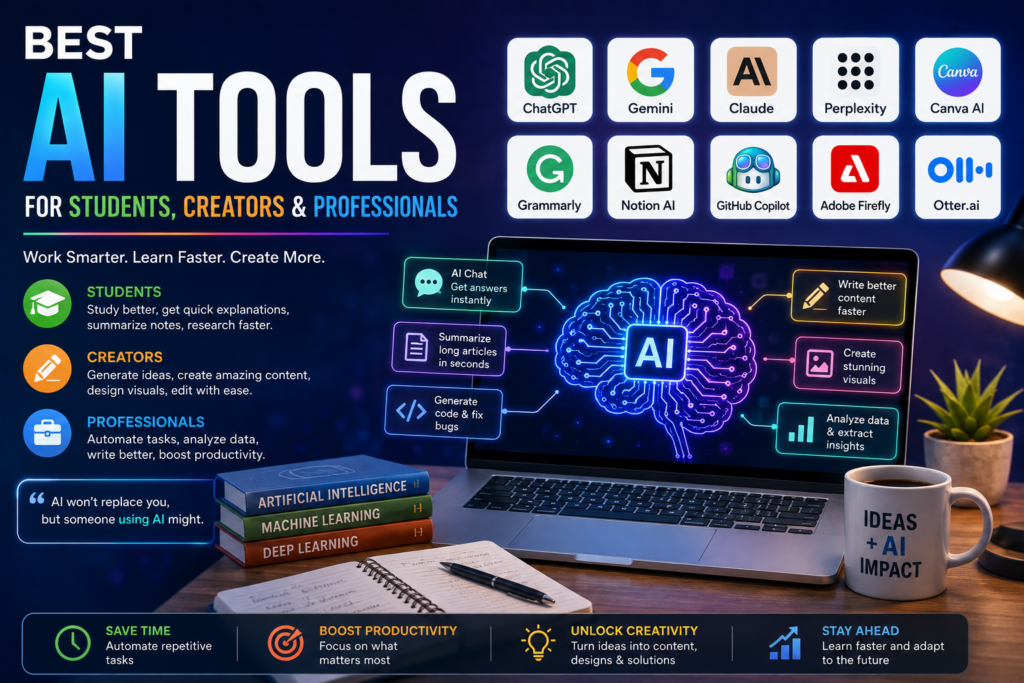
Artificial intelligence is quickly becoming part of everyday work and learning. Students are using AI to understand difficult topics, creators are using it to turn ideas into content, and professionals are using AI tools to save time on repetitive tasks.
The good news is that you don’t need to be an AI expert to benefit from the technology. The right AI tools can help you research faster, write better, organize your work, create visuals, and become more productive.
Here are some of the best AI tools worth exploring.
1. ChatGPT – Best All-Round AI Assistant
ChatGPT is one of the most versatile AI tools available today.
Students can use it to explain complex subjects, brainstorm assignments, create study questions, and practice new concepts. Creators can use it for content ideas, scripts, headlines, and editing. Professionals can use it for emails, reports, brainstorming, research, and everyday productivity.
Its biggest advantage is flexibility. You can give it a simple question or a detailed task and continue the conversation until you get something useful.
Best for: Students, creators, professionals, research, writing, brainstorming, and productivity.
2. Google Gemini – Best for Google Ecosystem Users
Google Gemini is useful for people who already rely heavily on Google’s ecosystem.
It can help with brainstorming, writing, research, summarization, and understanding information. Its integration with Google’s broader productivity ecosystem makes it particularly interesting for students and professionals who work with Google services.
Best for: Research, productivity, writing, and Google users.
3. Claude – Great for Writing and Long Documents
Claude has become popular among users who work with large amounts of text.
It can help analyse documents, summarise information, brainstorm ideas, write content, and explain complicated subjects in a conversational way.
For professionals dealing with reports, documentation, research material, or long-form writing, an AI assistant that can work with substantial amounts of information can be extremely useful.
Best for: Long-form writing, document analysis, research, and professional work.
4. Perplexity – AI-Powered Research
Searching for information online can sometimes mean opening dozens of tabs. Perplexity aims to make that process more conversational.
It is designed around AI-powered search and research, helping users find information and explore topics through natural-language questions.
Students can use it for initial research, while professionals can use it to quickly explore unfamiliar subjects.
Always verify important information against reliable primary sources before using it in academic or professional work.
Best for: Research, fact-finding, topic exploration, and quick information discovery.
5. Canva AI – Best for Easy Visual Content
Not everyone is a professional designer, and that’s where AI-powered design tools can help.
Canva’s AI features can assist with presentations, social media graphics, marketing materials, images, and other visual projects.
Creators can turn a basic idea into a polished design without spending hours learning complicated design software.
Best for: Social media content, presentations, marketing graphics, and beginners.
6. Grammarly – AI Writing Assistant
Good writing is important whether you’re submitting an assignment, sending an email, or publishing an article.
Grammarly can help users improve grammar, clarity, tone, and overall writing quality. Its AI features can also assist with rewriting and generating text.
For professionals who send emails every day or students who want cleaner writing, it can be a useful addition to their workflow.
Best for: Writing, proofreading, emails, and editing.
7. Notion AI – Best for Organisation
Managing notes, tasks, ideas, and projects can become difficult when everything is spread across different apps.
Notion combines workspace and productivity features with AI capabilities. Users can work with notes and documents while using AI to summarise information, brainstorm ideas, and organise content.
For students managing study notes or teams managing projects, this combination can save time.
Best for: Notes, project management, organisation, and productivity.
8. GitHub Copilot – Best for Developers
Programming can involve a lot of repetitive work, and AI coding assistants are changing how developers approach software development.
GitHub Copilot can assist developers with writing code, understanding code, generating suggestions, and completing programming tasks.
It doesn’t eliminate the need to understand programming. Developers still need to review, test, and secure the code generated by AI.
Best for: Developers, programmers, coding, and software projects.
9. Adobe Firefly – AI for Creators
Creators who work with images and visual content can explore Adobe Firefly’s generative AI capabilities.
It can help with creative experimentation, image generation, editing, and design workflows.
For designers and content creators, AI can be particularly useful during the early stages of a project when exploring different visual directions.
Best for: Designers, photographers, marketers, and visual creators.
10. Otter.ai – Useful for Meetings and Lectures
Taking notes during a meeting or lecture can mean missing important parts of the conversation.
AI transcription tools such as Otter.ai can help turn spoken conversations into text and make it easier to review discussions later.
Students can use transcription tools for lectures where permitted, while professionals can use them to organise meeting notes and discussions.
Best for: Meetings, lectures, interviews, and note-taking.
Which AI Tool Should You Choose?
There isn’t one AI tool that is perfect for everyone. The best choice depends on what you actually want to accomplish.
| User | Useful AI Tools |
|---|---|
| Students | ChatGPT, Gemini, Perplexity, Notion AI |
| Content Creators | ChatGPT, Canva AI, Adobe Firefly, Grammarly |
| Professionals | ChatGPT, Claude, Notion AI, Grammarly |
| Researchers | Perplexity, ChatGPT, Claude |
| Developers | ChatGPT, Claude, GitHub Copilot |
| Designers | Canva AI, Adobe Firefly |
How to Use AI Without Becoming Too Dependent on It
AI is powerful, but it should support your skills rather than replace them.
Before using AI-generated information, check important facts. When writing academic or professional content, add your own analysis and experience. Never blindly copy an AI response and assume it is correct.
The strongest results usually come from combining AI speed with human judgement.
The Future of AI Tools
AI tools are becoming more capable and easier to use. What once required several different applications can increasingly be handled through a single AI-powered workflow.
For students, this could mean more personalised learning. For creators, faster production and experimentation. For professionals, less time spent on repetitive work.
The goal isn’t to use every new AI tool that appears. Instead, find a few tools that solve real problems in your daily life and learn how to use them effectively.
Final Thoughts
The best AI tools are not necessarily the ones with the longest feature lists. They are the tools that genuinely make your work easier.
Whether you’re studying for an exam, creating your next video, designing content, managing projects, writing emails, or developing software, AI can become a valuable assistant.
Start with one tool, experiment with it, and build your own workflow. As AI continues to evolve, knowing how to work alongside these tools may become one of the most valuable digital skills of the decade.
SEO Keywords
Primary keyword: best AI tools for students, creators & professionals
Secondary keywords: best AI tools, AI tools for students, AI tools for creators, AI tools for professionals, artificial intelligence tools, AI productivity tools, best AI software, AI tools for work, AI tools for education