The internet has become part of almost everything we do. We shop online, manage our finances, work remotely, share photos, use social media, and store important files in the cloud.
But with convenience comes risk.
Cybercriminals are constantly looking for ways to steal passwords, personal information, financial details, and access to online accounts. The good news is that you don’t need to be a cybersecurity expert to protect yourself.
A few smart habits can make a big difference.
What Is Cybersecurity?
Cybersecurity is the practice of protecting computers, smartphones, networks, accounts, and digital information from unauthorized access, attacks, and other online threats.
These threats can include phishing scams, malware, stolen passwords, fake websites, account takeovers, and data breaches.
Cybersecurity isn’t only a concern for large companies. Everyday internet users are also targets.
Why Online Privacy Matters
Cybersecurity and privacy are closely connected, but they aren’t exactly the same thing.
Cybersecurity focuses on protecting your information and devices from threats. Privacy is about controlling what personal information is collected, shared, stored, and used.
Think about how much information your digital accounts may contain:
- Your name and contact details
- Photos and personal messages
- Location information
- Shopping history
- Financial information
- Search activity
- Work documents
- Personal preferences
Protecting this information should be part of your everyday digital routine.
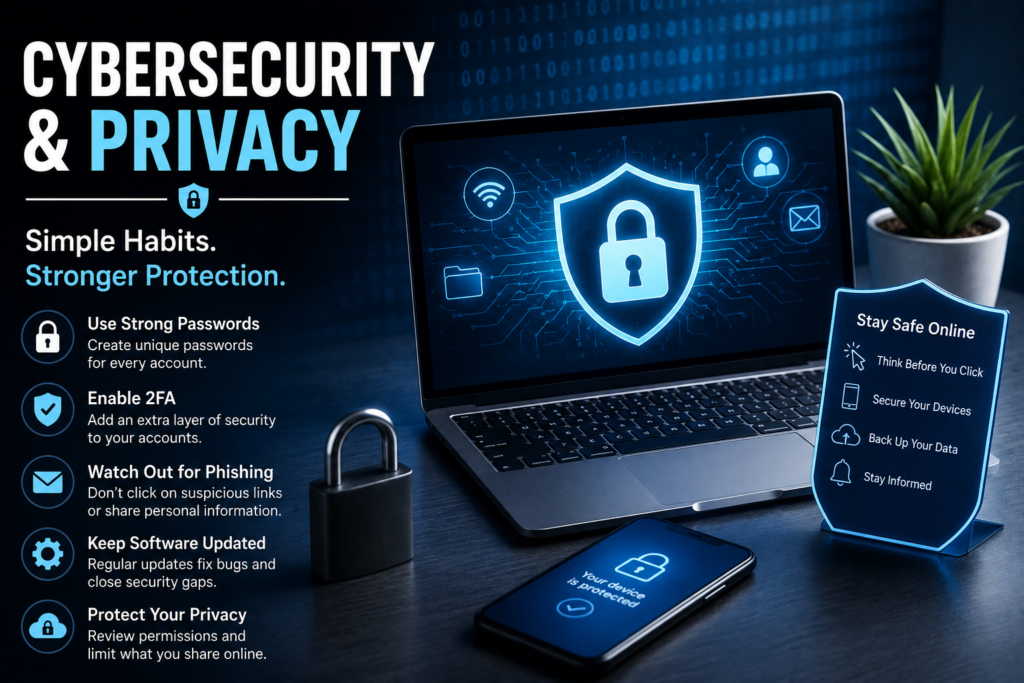
1. Use Strong, Unique Passwords
Using the same password for multiple accounts is one of the easiest mistakes to make.
If one website experiences a data breach and your password is exposed, attackers may try the same password on your email, social media, shopping, or financial accounts.
Create a unique password for every important account.
If remembering multiple passwords sounds impossible, consider using a reputable password manager to securely store them.
2. Turn On Two-Factor Authentication
A password alone isn’t always enough.
Two-factor authentication (2FA) adds another layer of protection by requiring an additional verification method when you sign in.
Depending on the service, this could involve an authenticator app, security key, or another verification method.
Enable 2FA on important accounts whenever it is available, particularly email, financial, cloud storage, and social media accounts.
3. Learn to Recognize Phishing
Phishing is one of the most common ways criminals try to steal information.
You might receive an email or message claiming to be from a bank, delivery company, social network, employer, or another familiar service. The message may ask you to click a link, confirm your account, or provide personal information.
Don’t automatically trust a message because it looks professional.
Check the sender, examine the link carefully, and avoid entering sensitive information through unexpected links.
When in doubt, open the company’s official website or app directly instead of using the link in the message.
4. Keep Your Devices Updated
Software updates aren’t just about new features.
Operating system and application updates often include important security fixes. Delaying updates for too long can leave known vulnerabilities unpatched.
Turn on automatic updates where appropriate and regularly check for updates on your smartphone, computer, browser, and important applications.
5. Be Careful With Public Wi-Fi
Public Wi-Fi can be convenient at airports, hotels, cafés, and other locations.
However, you should be cautious when using unfamiliar networks, especially when handling sensitive information.
Avoid connecting to networks with suspicious names, and don’t assume that a network is safe simply because it appears to be provided by a legitimate business.
For sensitive activities, use your mobile connection or another trusted network when possible.
6. Review App Permissions
Many apps request access to features such as your camera, microphone, contacts, location, and files.
Some permissions may be necessary for an app to work properly. Others may not be.
Take a few minutes to review the permissions granted to your applications. If an app doesn’t need access to something, consider removing that permission.
This is a simple way to improve both privacy and security.
7. Don’t Overshare on Social Media
Social media can reveal more information than you might realize.
Posting your location, travel plans, workplace details, personal documents, or other sensitive information can potentially make you easier to target.
Review your privacy settings and think carefully before sharing personal information publicly.
Not everything needs to be online.
8. Be Careful About What You Download
Malware can hide inside seemingly harmless downloads, applications, documents, and browser extensions.
Download software from trusted sources whenever possible. Be particularly cautious with pirated software, suspicious browser extensions, unknown email attachments, and files from strangers.
If something feels suspicious, don’t open it simply because you’re curious.
9. Back Up Important Files
Cybersecurity isn’t only about preventing attacks. It’s also about being prepared if something goes wrong.
Important photos, documents, business files, and other data should have reliable backups.
Consider maintaining backups using a trusted cloud service, external storage, or a combination of both.
A backup can be extremely valuable if your device is lost, damaged, or affected by malware.
10. Protect Your Email Account
Your email account deserves extra attention because it may be connected to many of your other accounts.
If someone gains access to your email, they may be able to reset passwords for other services.
Use a strong, unique password and enable two-factor authentication. Review account recovery options and check for unusual login activity when your provider offers those features.
Cybersecurity Mistakes to Avoid
Even people who understand online security can make simple mistakes.
Try to avoid:
- Using the same password everywhere
- Clicking suspicious links
- Downloading unknown software
- Sharing sensitive information publicly
- Ignoring security updates
- Giving every app unnecessary permissions
- Leaving old accounts active
- Using unsecured devices for sensitive activities
- Ignoring unusual login notifications
Small mistakes can sometimes create big security problems.
What About AI and Online Privacy?
Artificial intelligence has become a useful part of everyday technology, but it also introduces new privacy considerations.
Before entering information into an AI service, think about whether that information is sensitive. Avoid casually sharing passwords, financial information, private documents, confidential business information, or other data that shouldn’t be exposed.
AI tools can be extremely useful, but the same basic privacy principle still applies: don’t share sensitive information unless you understand how it will be handled.
A Simple Cybersecurity Checklist
You don’t have to change everything at once.
Start with these basic steps:
Use unique passwords
Enable two-factor authentication
Keep your devices updated
Watch out for phishing
Review app permissions
Back up important files
Secure your email account
Be careful on public Wi-Fi
Limit what you share online
Download software from trusted sources
Final Thoughts
Good cybersecurity and privacy don’t require complicated technical knowledge. They come down to developing better digital habits.
Use strong passwords, protect important accounts with two-factor authentication, keep your software updated, think before clicking unfamiliar links, and be selective about the information you share online.
The internet isn’t going away, and neither are online threats. But by taking a few minutes to improve your digital security, you can make it much harder for attackers to access your accounts and personal information.